
How to Use an AI Music Maker with Audio Samples and Uploads
The landscape of music creation is undergoing a seismic shift. Gone are the days when producing a professional-sounding track required years of training and a studio full of expensive gear. Today, AI music makers are democratizing composition, allowing anyone with a spark of an idea to bring it to life. But what truly unlocks the power of these tools is the ability to guide them with your own audio—your voice, a hummed melody, or an inspiring track. This guide will walk you through the process of using an AI music maker from sample, how to upload audio for reference, and the creative possibilities this unlocks.
Why Audio Inputs Are a Game-Changer for AI Music
Traditional AI music generators often start from a text prompt: "a chill lo-fi beat with piano and rain sounds." While powerful, this method can feel abstract. Using audio as your starting point changes everything. It allows you to:
- Translate Ideas Directly: Hum a melody, beatbox a rhythm, or strum a chord progression. The AI can interpret these audio cues into fully realized instruments.
- Capture a Specific Vibe: Have a song you love the mood of? Using it as a reference helps the AI music maker with reference audio understand the nuances of genre, instrumentation, and emotion.
- Remix and Reimagine: Upload a vocal take, a guitar riff, or any audio sample. The AI can generate complementary backing tracks, transform the sample's style, or weave it into a new composition.
- Overcome Creative Blocks: Stuck on a loop? Feed it into the AI. It can suggest variations, develop the idea, or take it in a surprising new direction.
This shift from text-only to audio-guided generation makes the AI music maker a true collaborative partner, bridging the gap between your internal inspiration and a finished piece.
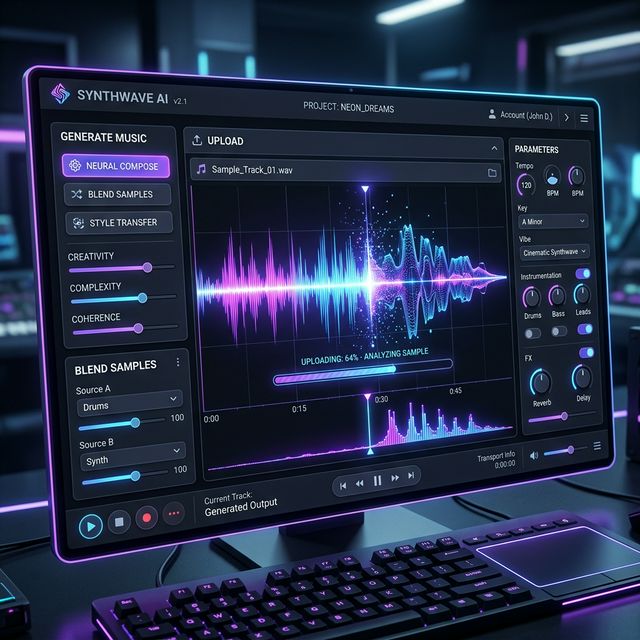
Method 1: Starting from a Sample (AI Music Maker from Sample)
This method is perfect when you have a short audio clip—a field recording, a synth loop, or a recorded idea—that you want to use as the foundational seed for a new track.
Step-by-Step Process:
- Prepare Your Sample: Keep it clean. Trim your audio to the most compelling 5-15 seconds. Reduce background noise if possible. A clear sample gives the AI a stronger signal to interpret.
- Choose the Right Platform: Select an AI music maker that explicitly supports "audio-to-audio" or "sample-based" generation. Look for terms like "generate from audio," "use a sample," or "audio inspiration."
- Upload and Describe: Upload your prepared sample. Here, you'll often combine the audio with a text prompt. For example: Upload: "guitar_chord.wav" + Prompt: "Expand this into a full indie folk arrangement with warm vocals and steady drums."
- Adjust Parameters: Use available controls to influence the output. Key parameters might include:
- Influence Strength: How closely should the AI adhere to your sample's melody/harmony?
- Style Transfer: How much of the sample's sonic texture should be preserved?
- Genre & Mood Tags: Further steer the results.
- Generate and Iterate: Hit generate! You'll rarely get a perfect result on the first try. Use the best output as a new starting point, adjust your parameters, and regenerate.
Pro Tip:
Try using unconventional samples. The sound of rain, a coffee machine, or street noise can be transformed into unique atmospheric pads or rhythmic elements by a powerful AI music maker from sample.
Method 2: Using Reference Tracks (AI Music Maker with Reference)
This technique is about capturing the essence, not copying the content. You use a full song as a blueprint for the AI to understand complex attributes like production style, arrangement, and emotional impact.
How to Leverage Reference Tracks Effectively:
- Select a Clear Reference: Choose a track with a distinct and consistent production style. A muddy or overly complex reference might confuse the AI.
- Upload the Reference Audio: In platforms that support it, you will upload audio as a "reference track" or "style guide." This is separate from a starting melody.
- Craft a Complementary Prompt: Your text prompt should work with the reference. For instance: Reference Track: "Billie Eilish - ocean eyes" + Prompt: "Create an original dream-pop ballad with whispered female vocals and sparse, echoing percussion."
- Focus on Abstract Qualities: The AI music maker with reference is best at interpreting abstract qualities. Think: "the warmth of the bass in this track," "the spacious reverb on the vocals," or "the driving energy of the chorus."
- Legal & Ethical Note: You are using the track for style inspiration only. The AI should generate completely original melodies and compositions. Always respect copyright and use this as a learning and inspiration tool.

Method 3: Uploading Your Own Stems and Loops
For musicians with existing material, this is the most powerful workflow. You can upload audio stems (like a vocal track, a bassline, or a drum loop) and have the AI generate the missing parts.
Practical Applications:
- Generate Accompaniment: Upload a solo vocal track. Prompt the AI to generate a full backing track in the style of synth-pop or acoustic soul.
- Create Variations: Upload a 4-bar piano loop. Ask the AI to generate variations for the verse, chorus, and bridge to help you structure a song.
- Sound Design & Texturing: Upload a simple synth pad. Use the AI to process it into an evolving, cinematic texture.
This turns the AI music maker into an intelligent co-producer that can fill in the blanks of your arrangement based on the pieces you provide.
Choosing the Right AI Music Tool for Audio Inputs
Not all platforms are created equal. When your goal is to work with samples and uploads, look for these features:
- Audio Input Support: Clearly stated ability to upload audio or use samples.
- Control Granularity: Sliders for "similarity" or "creativity" to fine-tune how the AI uses your input.
- Stem Separation & Handling: Some advanced tools can isolate elements from your upload, allowing you to replace or enhance specific parts.
- Output Format & Length: Ensure it can export the formats you need (WAV, MP3) and generate sections long enough for your project.
Best Practices and Creative Tips
- Start Simple: Begin with a clear, monophonic sample (like a hummed melody) before moving to complex chords or full mixes.
- Layer Your Guidance: Combine a strong reference track with a descriptive text prompt for the most targeted results.
- Embrace the Happy Accident: Sometimes, a low "influence" setting or an unusual sample leads to the most unique and inspiring results. Experiment!
- Post-Process is Key: The AI generates a foundation. Use a Digital Audio Workstation (DAW) like Ableton, FL Studio, or even free tools like BandLab to edit, mix, and add your final human touch.
Conclusion: Your Audio, Amplified
The ability to use an AI music maker from sample or upload audio as a reference transforms these tools from autonomous composers into responsive collaborators. They become an extension of your creativity, capable of interpreting your musical ideas—whether they're a hum, a beat, or a favorite song's vibe—and building upon them in astonishing ways. The process is no longer just about typing a description and hoping for the best; it's a dialogue where your audio provides the vocabulary. So, dig through your old voice memos, isolate that catchy riff, or choose a reference track that moves you. Upload it, guide it, and start a new kind of creative conversation. The next step in your musical journey is just a sample away.